
Understanding Your Business Storage Options
Choosing the right storage solution is an important decision for any business. When comparing cloud vs local storage, it’s important to understand how each option impacts security, accessibility, collaboration, and long-term costs.Whether you’re storing customer data, company documents, or important project files, you need a solution that keeps your information secure, accessible, and protected against data loss.
When comparing cloud vs local storage, there isn’t a one size fits all answer. Both options have unique advantages and potential drawbacks, and the best choice depends on your business’s size, budget, security requirements, and how your employees work.
In this guide, we’ll compare cloud vs local storage, explain the benefits of each, and help you determine which solution is the right fit for your business.
What is Cloud Storage?
Cloud storage stores your files on secure remote servers managed by a cloud service provider rather than on computers or servers located in your office.
Instead of accessing files from a local device, employees can securely access data through an internet connection from virtually anywhere.
Common business cloud storage platforms include:
- Microsoft OneDrive
- Microsoft SharePoint
- Google Drive
- Dropbox Business
Cloud storage has become increasingly popular because it supports remote work, simplifies collaboration, and allows businesses to scale their storage without purchasing additional hardware.
What Is Local Storage?
Local storage keeps files on physical devices owned or managed by your business.
This may include:
- Desktop computers
- Office servers
- Network Attached Storage (NAS)
- External hard drives
Unlike cloud storage, local storage doesn’t rely on an internet connection to access files within your office. Your business has complete control over the hardware, maintenance, and security of its storage environment.
However, that also means your business is responsible for maintaining the equipment, performing updates, and protecting the data from hardware failures or cyber threats.
Cloud vs Local Storage: What's The Difference?
While both options store your business data, they do so in very different ways.
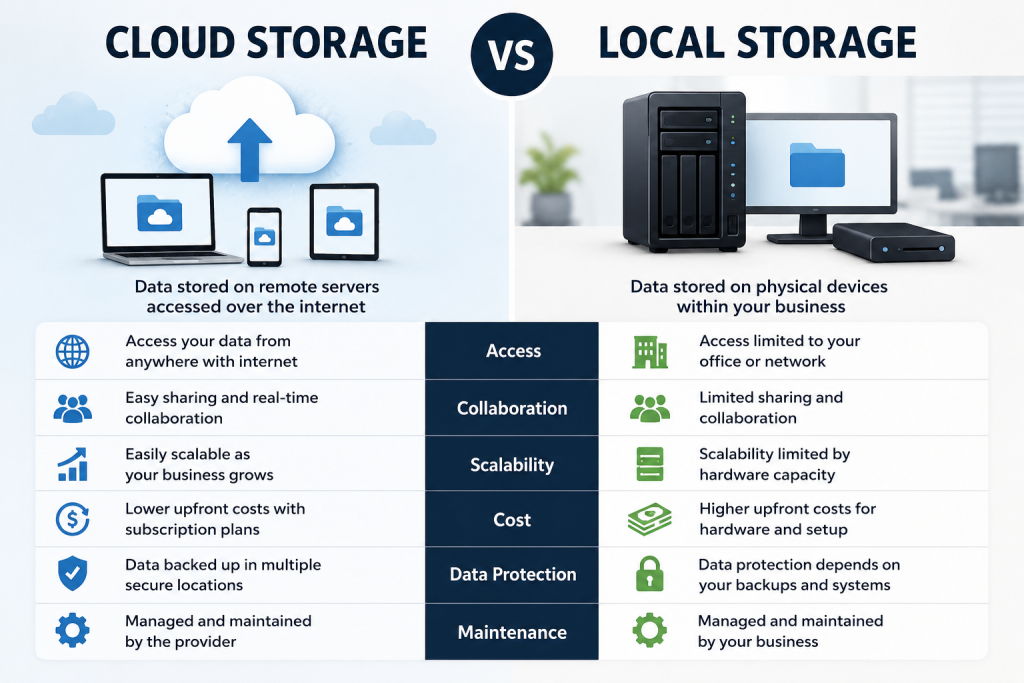
While both options store your business data, they do so in very different ways.
Benefits of Cloud Storage
Cloud storage offers flexibility that traditional storage often cannot match.
Some of the biggest benefits include:
1. Access From Anywhere
Employees can securely access files whether they’re working in the office, at home, or traveling. This flexibility has become increasingly important as remote and hybrid work environments continue to grow.
2. Easier Collaboration
Cloud storage allows multiple employees to work on the same files in real time without creating duplicate versions or emailing documents back and forth. This improves productivity and keeps teams working from the most current version of every file.
3. Easy Scalability
As your business grows, adding additional storage is often as simple as upgrading your subscription instead of purchasing new hardware.
4. Reduced Hardware Costs
Businesses don’t need to invest as heavily in expensive servers or storage equipment, reducing upfront costs and ongoing maintenance.
5. Built-In Redundancy
Most cloud providers store multiple copies of your data across different data centers, helping protect against hardware failures.
Benefits of Local Storage
Although cloud storage has grown in popularity, local storage still offers important advantages.
1. Faster Access for Large Files
Businesses working with large video files, CAD drawings, or specialized software may experience faster performance when files are stored locally.
2. Greater Control
Your organization maintains direct control over its hardware, storage systems, and security configurations.
For businesses with strict compliance or operational requirements, this level of control may be important.
3. No Internet Dependency
Employees can continue accessing local files even if your internet connection is temporarily unavailable.
4. One-Time Hardware Investment
Rather than paying monthly subscription fees, businesses purchase storage equipment upfront.
While maintenance costs still exist, there are fewer recurring storage fees.
Is Cloud Storage More Secure Than Local Storage?
Security is often one of the biggest concerns when comparing cloud vs local storage. The truth is that both options can be secure when properly managed.
Cloud providers invest heavily in security features such as:
- Encryption
- Multi-Factor Authentication
- Access controls
- Continuous monitoring
- Data redundancy
Local storage can also be highly secure, but only if your business properly maintains servers, installs security updates, manages backups, and monitors for cyber threats.
Ultimately, security depends less on where your data is stored and more on how well it’s protected.
Which Option Costs Less?
Cloud storage typically requires a predictable monthly subscription based on the amount of storage and the number of users.
Local storage generally involves larger upfront costs for servers, networking equipment, and installation, along with ongoing maintenance and eventual hardware replacement.
While local storage may appear less expensive over time, businesses should also consider:
- IT maintenance
- Hardware upgrades
- Power costs
- Backup solutions
- Disaster recovery planning
The total cost of ownership often depends on your business’s size and IT requirements.
Should Your Business Use Both?
For many organizations, the best answer isn’t choosing cloud or local storage. It’s using both.
A hybrid storage strategy combines the accessibility of cloud storage with the performance and control of local storage.
For example, a business might:
- Store active documents in Microsoft 365 for collaboration
- Keep large production files on local servers
- Maintain cloud backups for disaster recovery
This approach provides flexibility while improving business continuity.
How to Choose Between Cloud and Local Storage
Every business has different storage needs.
Consider the following questions:
- Do employees work remotely?
- How much data does your business store?
- Do you have compliance requirements?
- What’s your IT budget?
- How important is collaboration?
- Do you have in-house IT staff?
- How quickly is your business growing?
Answering these questions can help determine which solution best aligns with your business goals.