

What is Smishing?
Your phone buzzes.
The message says your package couldn’t be delivered, your bank account has been locked, or you owe an unpaid toll. It looks legitimate, creates a sense of urgency, and asks you to click a link immediately.
In reality, it’s a smishing attack.
So, what is smishing? Smishing, short for SMS phishing, is a cyberattack that uses fraudulent text messages to trick victims into revealing sensitive information, downloading malware, or visiting fake websites. As businesses and individuals rely more heavily on mobile devices, smishing attacks have become one of the fastest-growing forms of phishing.
Understanding how these attacks work is the first step toward protecting yourself and your organization.
How Smishing Works
Smishing is a type of phishing attack that uses SMS (Short Message Service) or other mobile messaging platform instead of email to deceive victims.
Rather than exploiting software vulnerabilities, attackers exploit human trust and urgency. They often impersonate trusted organizations such as:
- Banks and credit card companies
- Shipping carriers
- Government agencies
- Employers
- Microsoft or Apple
- Online retailers
These fraudulent messages typically encourage recipients to:
- Click a malicious link
- Call a fake customer support number
- Download malicious software
- Enter login credentials on a fake website
- Share passwords or Multi-Factor Authentication (MFA) codes
Unlike email, text messages often feel more personal and urgent, making victims more likely to respond without stopping to verify whether the request is legitimate.
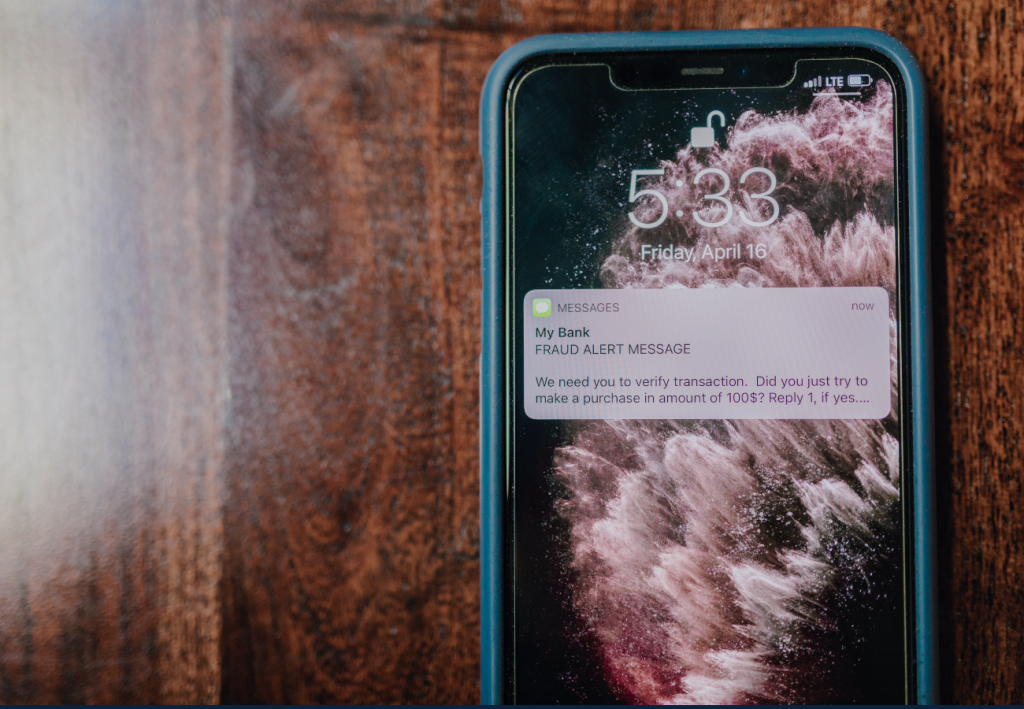
Typically the way it goes...
Most smishing attacks follow the same basic process.
Step 1: The attacker sends a fraudulent text message.
Cybercriminals often send thousands of messages at once, hoping a small percentage of recipients will respond.
Step 2: The message creates urgency.
Examples include:
- Your package couldn’t be delivered.
- You owe an unpaid toll.
- Your bank account has been suspended.
- Your Microsoft 365 account requires verification.
- Your Netflix payment failed.
Step 3: The victim interacts with the message.
The victim clicks a link, calls a phone number, downloads an attachment, or enters personal information into a fake website.
Step 4: The attacker gains access.
Depending on the scam, attackers may steal login credentials, install malware, collect financial information, or bypass security controls such as MFA.
Using the SLAM Method to defend against Smishing attempts
While every smishing attack is different, most share several warning signs. Remember the SLAM Method before responding to any unexpected text message.
S – Sender
Is the number familiar?
Unexpected texts from unknown numbers or email addresses sent via text should immediately raise suspicion.
L – Links
Avoid clicking suspicious links.
Look for shortened URLs, misspelled domain names, or links that don’t match the company claiming to have sent the message.
A – Ask Yourself
Were you expecting this message?
If you weren’t expecting a package, payment reminder, or password reset request, verify it through the organization’s official website or customer service number.
M – Message
Pay attention to the wording.
Red flags include:
- Urgent requests
- Threats of account suspension
- Requests for passwords or verification codes
- Poor grammar or spelling
- Offers that seem too good to be true
Common Tactics Used by Cyber criminals
Cybercriminals constantly change their tactics, but many scams follow familiar patterns.
Some of the most common include:
- Package delivery scams
- Unpaid toll notifications
- Bank fraud alerts
- Password reset messages
- Gift card scams
- Fake tax refund texts
- Payroll or HR impersonation
- Microsoft 365 verification texts
Want to see what these scams actually look like? Read our 7 Common Smishing Scams to Watch Out For for real-world examples and warning signs.
Should Businesses Should Be Concerned About Smishing
Smishing attacks don’t just target consumers.
Employees regularly use smartphones to access Microsoft 365, email, collaboration platforms, banking apps, and company resources. A successful smishing attack can lead to:
- Stolen credentials
- Unauthorized account access
- Financial fraud
- Malware infections
- Data breaches
- Business disruption
- Compliance violations
Because mobile devices often operate outside traditional network security controls, they’re an increasingly attractive target for cybercriminals.
How to Protect Yourself from Smishing
Protecting yourself starts with awareness and good cybersecurity habits.
Best practices include:
- Never click unexpected links in text messages.
- Verify requests directly with the organization.
- Enable Multi-Factor Authentication (MFA).
- Keep your phone’s operating system updated.
- Only download apps from trusted sources.
- Report suspicious messages to your mobile carrier.
- Delete suspicious texts after reporting them.
- Participate in regular Cyber Security Training.
What Should You Do If You Receive a Smishing Text?
If you believe you’ve received a smishing message:
- Do not click any links.
- Do not reply to the message.
- Verify the request using the company’s official website or phone number.
- Report the message as spam.
- Delete the message.
- If you clicked the link, immediately change your passwords and notify your IT department.
Responding quickly can significantly reduce the impact of a successful attack.
Building a Strong Defense Against Smishing
Smishing attacks continue to evolve as cybercriminals find new ways to exploit the trust people place in text messages. While no security solution can eliminate every threat, businesses can significantly reduce their risk by combining employee education with strong cybersecurity practices.
An effective defense against smishing includes:
- Regular Security Awareness Training to help employees recognize suspicious text messages.
- Multi-Factor Authentication (MFA) to protect accounts even if credentials are compromised.
- Strong Email Security and identity protection to reduce the impact of phishing attacks across multiple communication channels.
- Routine security assessments and policies that help identify and address potential vulnerabilities before they can be exploited.
By taking a proactive approach to cybersecurity, organizations can better protect their employees, sensitive data, and business operations from smishing and other social engineering attacks.
If your business is looking to strengthen its cybersecurity strategy, CATS Technology Solutions provides Security Awareness Training, Multi-Factor Authentication (MFA), Email Security, and comprehensive Cybersecurity Services designed to help organizations stay protected against today’s evolving threats.